All Articles
The Journal
How to Triage Your Inbox and Tasks Like a Chief of Staff
September 22, 202613 min readinbox triagedelegation system
Learn how to triage incoming messages, tasks, and decisions like a chief of staff. Reclaim hours, delegate cleanly, and stop carrying operational noise alone.
At 7:42 on Monday morning, you lift the laptop lid and find 84 unread emails, a Slack channel firing notifications, three calendar invitations competing for the first hour, and a vendor issue that arrived in a Slack DM at midnight. You open the inbox and start reading from the top. It feels responsible, even disciplined. By the time you reach the message that needs your judgment, the morning has already been spent processing other people's priorities.
The answer isn't to sort faster. Triage is a delegation discipline, not a willpower contest. Modern triage began as a way to allocate scarce human judgment when demand exceeded immediate capacity, a logic formalized in military medicine during the French and Napoleonic eras and associated with Dominique-Jean Larrey's rapid sorting system in this historical review of triage. Your inbox has the same structural problem, only with fewer stretchers and more calendar conflicts.
A chief of staff doesn't personally touch every incoming request. They establish a routing system, reserve personal attention for decisions that require authority, and move everything else to the right operator. That's the operating system you need for how to triage your inbox and tasks without turning every morning into unpaid coordination work.
The Monday Morning Avalanche and What It Really Costs You
Maya, a founder with a growing team, starts Monday by answering the easiest messages first. She confirms a lunch reservation, forwards a vendor invoice, replies to a colleague with a quick “sounds good,” and accepts a meeting that should never have reached her calendar. Each action is small. Together, they create the illusion of progress while the hiring decision, customer escalation, and product review remain untouched.
The inbox rewards this behavior because it presents tasks in arrival order, not consequence order. Slack adds another layer of false urgency. A notification feels like an obligation, even when the sender hasn't explained the desired outcome, deadline, or decision required. Maya isn't failing at focus. She's functioning as an intake coordinator, scheduler, researcher, and follow-up manager before she's had the chance to act as a founder.
That distinction matters. A chief of staff's operating model starts by protecting executive attention, not by teaching the executive to process noise at higher speed. The work gets sorted before it reaches the person whose judgment carries the highest opportunity cost.
The hidden second shift
Household administration creates the same drag outside work. Research on American adults estimates average household-management time at 1.04 hours per week under a narrow measure and 1.64 hours under a broader measure, while people who perform these tasks can spend roughly 5.6 to slightly more than 6 hours per week on them in the Journal of Family and Economic Issues study. A separate survey found that Americans estimated 14 hours per month on household tasks, while the measured figure was 42 hours per month, including 17 hours during work hours on home-maintenance-related tasks in this household-task time survey.
Those tasks rarely arrive as one large project. They appear as a pediatrician callback, a school form, a contractor question, a rescheduled appointment, and a bill that needs clarification. The administrative fragments interrupt the workday because nobody owns the routing.
Practical rule: If a task can be completed by someone who has the right context but doesn't require your judgment, it shouldn't remain in your personal queue.
The first five-minute move is simple. Stop opening messages one by one. Mark every new item as Do Now, Schedule, or Delegate, then send the Delegate queue to a human Assistant team. Your job is to decide what deserves you. Their job is to make the rest disappear from your working memory.
The Three-Bucket Intake System That Stops the Bleeding
Use three buckets and make them mutually exclusive. Every inbound item gets a bucket before it gets a second look.
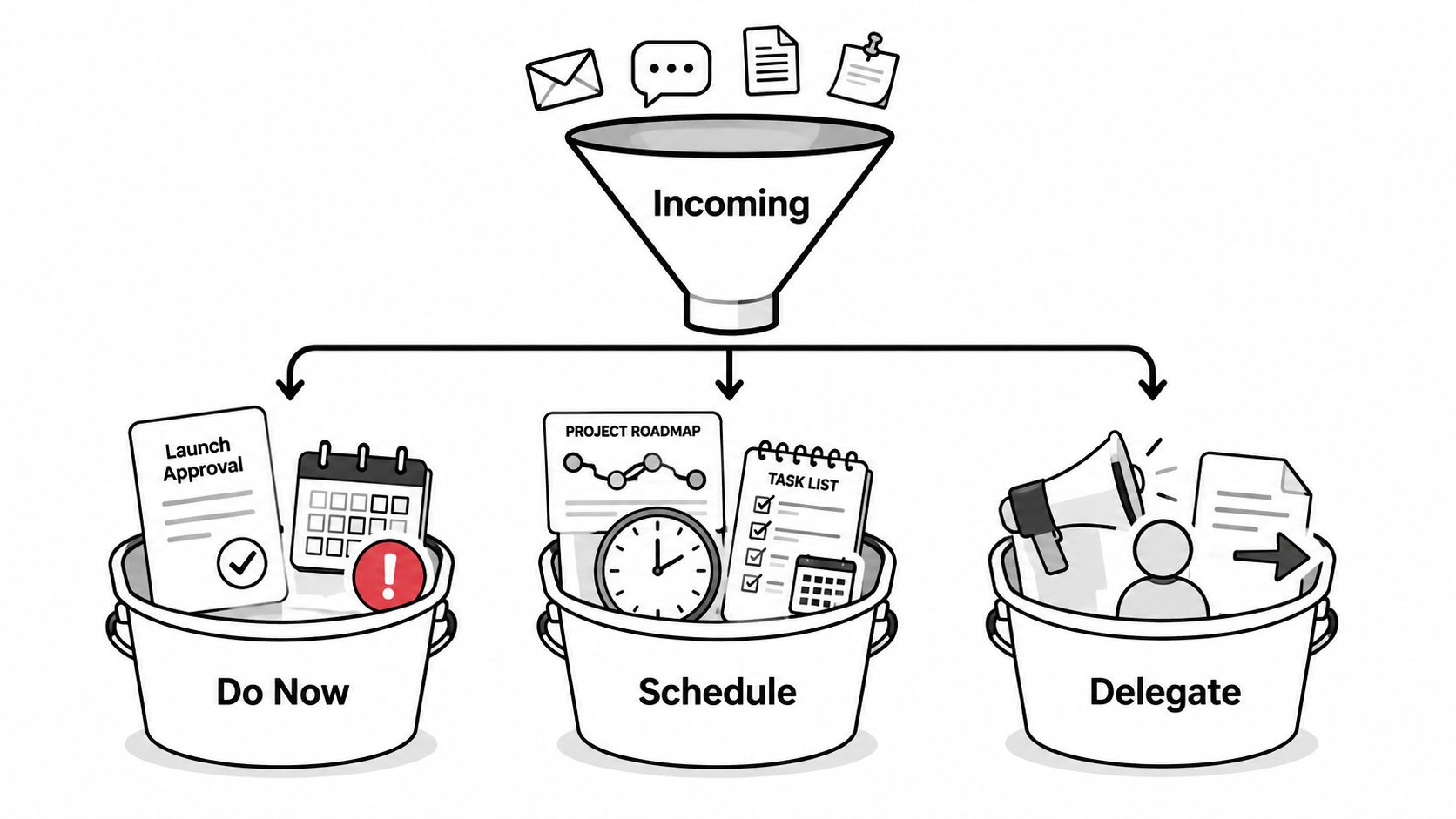
Do Now
This bucket is intentionally small. It contains work that requires your authority, judgment, or personal relationship today.
Examples include approving a launch email, signing off on a hire, resolving a sensitive client decision, or recording a short video only you can make. “This is important” isn't enough. The item belongs here only if another capable person can't complete it without your decision.
A founder might write, “Review the final offer terms and approve by noon.” An executive might write, “Decide whether we accept the revised partnership language today.” Those are decisions, not administrative chores.
Schedule
Schedule tasks have a real date, deadline, or dependency, but they don't deserve immediate attention. A quarterly review, board deck draft, annual renewal, or school enrollment deadline belongs here when the next action can be placed on a calendar.
Scheduling protects future work from becoming present panic. Assign a date, owner, and expected output. “Board deck” is vague. “Review the draft board deck on Thursday morning and return three edits” is schedulable.
Delegate
Delegate is the default bucket for execution. Send vendor coordination, appointment booking, scheduling back-and-forth, research pulls, inbox cleanup, meeting preparation, travel logistics, document formatting, and expense tracking to someone else.
For most professionals, this bucket should be the largest by far, often 60 to 70 percent of daily intake as an operating assumption, not a measured universal benchmark. The exact share matters less than the behavior. If Delegate is consistently the smallest bucket, you're probably treating familiarity as necessity.
| Bucket | Test | Examples |
|---|---|---|
| Do Now | Only you can decide or act today | Launch approval, hiring sign-off, sensitive client response |
| Schedule | A date or dependency matters, but not this minute | Quarterly review, board draft, renewal |
| Delegate | Someone else can produce the outcome with context | Vendor calls, research, inbox cleanup, meeting prep |
The system fails when an item sits unclassified or moves between buckets without an owner. Classify once, route once, and don't touch it twice unless the decision has changed.
Sizing Priority and Effort on the Same Grid
Priority and effort are separate variables. A short email can be urgent but insignificant. A two-hour strategy memo can be important without needing attention this morning. If you sort on only one axis, easy work crowds out consequential work.
Use an urgency-by-effort grid. High-effort, high-urgency work sits in the personal-priority quadrant. Low-effort, low-urgency work is the cleanest delegation opportunity. The other two quadrants need either scheduling or rapid routing, depending on consequence.
| Urgency by Effort Triage Grid | High Effort | Low Effort |
|---|---|---|
| High Urgency | High Effort, High Urgency: Work that requires your judgment today | Low Effort, High Urgency: Route quickly, then confirm completion |
| Low Urgency | High Effort, Low Urgency: Schedule protected focus time | Low Effort, Low Urgency: Delegate, batch, or defer |
Consider a morning queue containing ten items: a hiring decision, a client escalation, three meeting requests, a vendor comparison, travel changes, an invoice question, a research request, an inbox cleanup, and a draft presentation. The hiring decision is high effort and high urgency, so it earns your morning. The client escalation may require a short judgment call, but an Assistant can assemble the history and draft response first. The meeting requests, vendor comparison, travel changes, invoice question, research request, inbox cleanup, and presentation formatting are delegate-ready.
The ten-item queue becomes one personal priority and seven delegate-ready tasks, with the remaining items either scheduled or prepared for your decision. That is the point of the grid. It doesn't make every task smaller. It stops low-impact work from impersonating high-value work.
Connect the grid to outcomes
Use objectives to judge importance, not emotional intensity. A useful resource on backlog prioritization with OKRs can help connect incoming work to measurable outcomes rather than letting the loudest requester set the agenda.
Only the top-left quadrant earns your morning hours.
Everything else must justify why it remains with you. If the answer is “because nobody else knows the context,” document the context and delegate the next instance.
Handing Work to a Human Assistant Team by Call, Text, or Email
Delegation breaks when the handoff contains a verb but no definition of success. “Can you handle the hotel?” forces a follow-up. “Find a quiet hotel near the client office, arriving Tuesday and leaving Thursday, keep the nightly rate within the approved travel policy, and send three options by 3 p.m. by email” gives the Assistant team a runnable assignment.
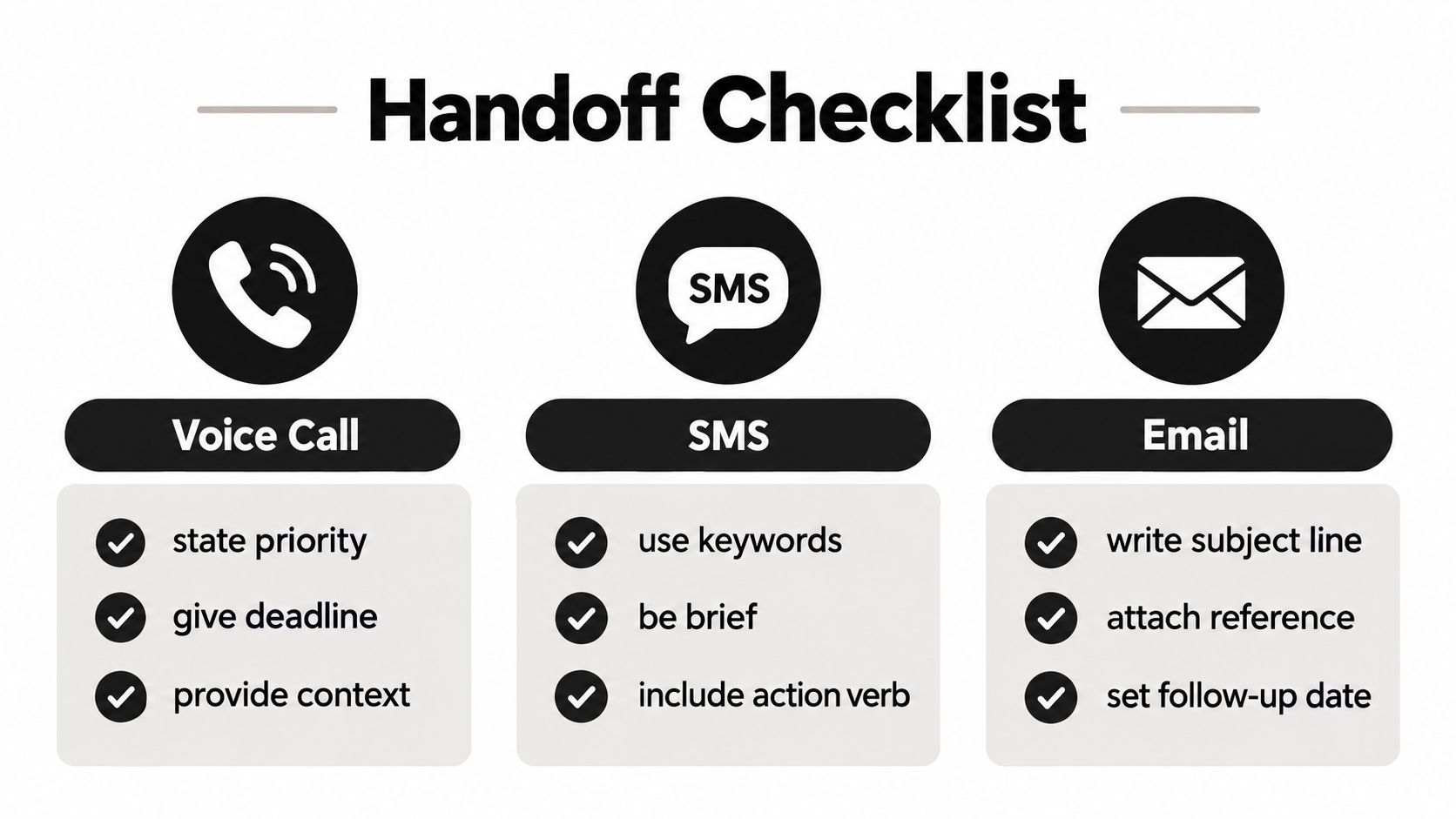
Triple-channel access lets you choose the channel based on the work, not the tool's limitations.
Match the channel to the handoff
Use a voice call for urgent, nuanced, or emotionally sensitive work. Explain the background, state what must happen, and identify what the team can decide without returning to you.
Use SMS for fast coordination. “Reschedule dentist appointment, keep it after school, confirm by text” is brief, clear, and action-oriented.
Use email for document-heavy or asynchronous tasks. Attach the reference material, write a descriptive subject line, and specify when you want an update.
Every handoff should answer five questions:
- Desired outcome: What should be finished, not merely attempted?
- Deadline: When does the result need to be in your hands?
- Constraints: What budget, timing, location, policy, or preference applies?
- Authority: What can the Assistant decide, and what requires approval?
- Confirmation: Should the update come by call, SMS, or email?
Try these formats:
Routine: “Please compare three local home-service providers, check availability next week, and email the options with pricing and reviews.”
Time-sensitive: “Please call the airline now, find the earliest workable alternative, and text me only if approval is needed.”
Multi-step: “Please coordinate the client dinner, confirm dietary requirements, reserve transportation, add the details to the calendar, and send me the final itinerary.”
A human Assistant team can also handle inbox triage, email drafting, document formatting, expense tracking, and meeting preparation. The useful handoff isn't the longest one. It's the one that removes ambiguity before work begins. For a deeper operational example, review how email management works with a virtual Assistant.
The video below shows the kind of communication flow that makes a handoff usable across channels.
Before sending, check the outcome, deadline, constraints, authority, and confirmation channel. If one is missing, expect another round of questions.
Why Delegation Beats Both DIY Sorting and AI-Only Triage
Solo triage gives you maximum control and minimum influence. You read every message, interpret every ambiguous request, decide what matters, and perform the follow-up. The model works only while demand stays low, and it trains everyone around you to use your attention as the default routing system.
AI-only triage improves classification speed but struggles with judgment calls. An automated tool may identify keywords, summarize a thread, or propose a label. It can't reliably resolve an ambiguous sender, understand why a routine-looking message carries relationship risk, or decide whether a vendor issue deserves escalation based on context it hasn't been given.
Controlled benchmarking illustrates the limitation. One symptom-checker study reported mean overall triage accuracy of 60.9% for human participants and 58% for symptom checkers in the benchmarking paper. Emergency triage research also found inter-rater agreement with a kappa of 0.77, strong but not perfect consistency between assessors in this systematic review table. Sorting is never a license to stop re-evaluating. Patients can deteriorate after looking well, and operational requests can change while they sit in a queue.
Three operating models
| Triage Model Comparison | Hours Reclaimed/Week | Judgment Calls | Escalation Path | Overhead |
|---|---|---|---|---|
| Solo triage | Qualitative, usually limited by personal capacity | Remains with you | You revisit everything | Personal time and attention |
| AI-only tools | Qualitative, depends on setup and review | You retain ambiguous decisions | Software flags or labels | Tool configuration and verification |
| Subscription-based human delegation | Qualitative, expands as more execution moves away from you | Human team handles context and routes exceptions | Assistant team escalates outside scope | Subscription, without direct-hire payroll management |
The subscription model wins operationally when you need predictable capacity, retained context, and human escalation without building a staff function. A recurring Assistant team can learn your norms, prepare decisions, and send an issue to a senior operator when standard scope isn't enough. That human-in-the-loop design is the subject of this guide to human-in-the-loop systems.
The relevant comparison isn't whether software can label an email. It's whether you can stop being the person who labels, researches, follows up, and checks completion.
Context-Rich Handoffs That Compound Into Less Friction
Raw queue order is a poor delegation input. “Oldest first” ignores client importance, asset criticality, service-level commitments, family norms, and the consequences of delay. A context-rich intake lets an Assistant act on the first pass instead of spending the next exchange asking what you meant.
Create a lightweight briefing file with the rules that recur:
- Preferences: Preferred airlines, appointment windows, restaurant constraints, gift standards, communication style.
- Contacts: Recurring vendors, family members, clients, school administrators, and internal decision owners.
- Norms: What can be approved independently, what requires confirmation, and what should never be scheduled.
- Escalation rules: Which words, deadlines, dollar limits, or relationship concerns require immediate contact.
This isn't a giant manual. It's a living record of decisions you've already made. When the team knows that Tuesday afternoons are blocked, one child's school requires phone confirmation, and vendor quotes should be compared before approval, future requests arrive pre-processed.
A preference log in practice
During the first handoff, you might write: “For family appointments, use late afternoon where possible. Don't schedule over school pickup. Text me if the only available option breaks either rule.”
A later entry can add: “For home-service providers, prioritize insured vendors with strong recent reviews. Present two alternatives if the preferred provider can't meet the requested window.” The next home repair request then arrives with the decision criteria already attached.
Over a 30-day window, track clarifying questions rather than relying on memory. If the Assistant team asks for the same information repeatedly, the preference log is incomplete. If requests become executable from the original message, the operating relationship is gaining influence.
Security and incident teams increasingly emphasize this same principle. Effective prioritization depends on embedding identity, asset criticality, SLA tier, and business context at intake, and one guide recommends judging handover quality by whether a fresh analyst can understand the priority and next step within two minutes in this security-incident prioritization guide. Your inbox deserves the same standard. The handoff should tell the next person what matters and what happens next.
Your Two-Week Triage Rollout and the Metrics That Prove It Works
Don't redesign your entire life before testing delegation. Start with one intake window, one Assistant team, and a visible record of what leaves your queue.
The first morning
Capture your access preferences and operating rules. Decide whether urgent matters should reach you by call, SMS, or email. List recurring contacts, preferred scheduling windows, approval boundaries, and the categories that should be escalated immediately.
Then empty the current queue into the three buckets. Don't complete the Delegate items yourself to prove that you're busy. Send them with an outcome and deadline.
The first week
Reserve a daily 10-minute triage window to review Do Now items, confirm Schedule dates, and release new Delegate work. Maintain a 48-hour delegation backlog so the Assistant team has enough visibility to group related requests rather than processing every item as an isolated interruption.
Caregiving needs special attention. A 2025 study found that providing 20 hours or more of care per week was associated with more poor mental-health days, and intensive caregiving is commonly defined as more than 20 hours weekly in this caregiving study. If family coordination is approaching that threshold, treat appointments, medication follow-up, logistics, and sibling communication as a formal delegation lane, not occasional favors.
The second week
Add escalation rules. When a request exceeds internal capacity, involves a sensitive relationship, or carries an unclear consequence, the Assistant team should escalate through Triple-channel access instead of guessing. The escalation message should include the original request, work completed, open decision, and recommended next action.
Track the system with four practical measures:
| Two-Week Triage Rollout and Success Metrics | Action | Target Metric | Tracking Method |
|---|---|---|---|
| First morning | Capture preferences, access channels, and approval rules | A complete routing profile | Save the briefing file and review missing rules |
| First week | Hold a daily 10-minute triage window | Consistent daily routing | Record the calendar block and bucket counts |
| First week | Maintain a 48-hour delegation backlog | Fewer isolated interruptions | Review open handoffs at the daily window |
| Second week | Add escalation rules for exceptions | Clear escalation ownership | Count escalations and record resolution |
| Ongoing | Review messages cleared, hours reclaimed, response latency, and handoff share | Directional improvement across all four measures | Use a saved-hours log, calendar blocks, daily handoff count, and message timestamps |
Don't chase a perfect score. Look for fewer messages cleared personally, more hours returned to focused work, shorter response latency on delegated items, and a larger share of inbound volume handed off rather than handled by you.
At the 30-day checkpoint, ask one question: Should delegation scope expand because the team is handling routine work cleanly, or should the workflow tighten because the same exceptions keep recurring? The answer tells you whether to add categories, improve context, or narrow authority.
Approved Lux Personal Assistant provides a US-based human Assistant team reachable through call, SMS, or email for inbox triage, scheduling, travel logistics, research, errands, document work, and meeting preparation. Visit Approved Lux Personal Assistant to replace personal sorting with a delegation system that reclaims attention and reduces operational noise.
Want the wider view?
Ten categories. One report. Every quarter. The Approved List tracks what's rising and what's fading: data-backed signals, not opinions.
Free to join · Delivered by email