All Articles
The Journal
Outsourcing to a Virtual Assistant outsourcing to a virtual assistant for growth
February 1, 202621 min readvirtual assistantdelegate tasks
Discover how outsourcing to a virtual assistant can boost productivity. Learn task delegation, finding talent, and building an efficient workflow.

Bringing a virtual assistant on board is one of the smartest moves a busy professional can make. It’s all about strategically handing off the administrative, creative, or technical tasks that clog up your day to a remote expert. This frees you up to focus on the work that actually moves the needle, all without the costs and headaches of hiring a full-time employee.
Why Outsourcing to a Virtual Assistant Is a Growth Strategy
Let's get real for a moment. The mental load that comes with a jam-packed schedule is completely draining. So many founders I talk to see delegation as some far-off luxury, but that’s the wrong way to look at it.
Outsourcing to a virtual assistant isn't an expense; it's a strategic investment in your own productivity and, frankly, your sanity.
It’s about getting rid of the decision fatigue that piles up from juggling a dozen small but necessary tasks. Think about it: every minute you spend on scheduling or inbox management is a minute you aren't spending on strategy, sales, or product development.
And you don't have to be a Fortune 500 CEO to make this work. If you’re buried under emails, constantly trying to coordinate schedules, or spending hours on research, you're the perfect candidate. The goal is simple: get your time back, starting with the very first task you delegate.
Beyond Freelancers: A Smarter Way to Delegate
The thought of hiring someone can be daunting. You've got to find them, vet them, onboard them, and then manage them. It’s practically a second job.
This is exactly where a managed service like Approved Lux changes the game. Instead of sifting through countless profiles on freelance platforms, you get instant access to a reliable, pre-vetted team that's ready to go. You skip the entire hiring and management process and jump straight to getting things done. Check out how these virtual personal assistant services are built for seamless support right from the start.
This isn't some niche trend, either. The acceptance of remote professional support is exploding. The global virtual assistant market was valued at around $19.5 billion in 2025 and is expected to hit $55.4 billion by 2035. That’s a massive 184% jump.
This huge growth shows that businesses everywhere are waking up to the power of remote delegation. Understanding how outsourcing to a virtual receptionist for small business can manage critical functions is a key part of this shift toward more agile and efficient ways of working.
Comparing Your Delegation Options
Deciding how to delegate is just as important as deciding what to delegate. Each option has its own set of trade-offs, from cost and commitment to management overhead. I've put together a quick comparison to help you see where each model shines.
| Factor | Full-Time Assistant | Freelance Virtual Assistant | Managed Service (e.g., Approved Lux) |
|---|---|---|---|
| Cost | Highest (salary, benefits, taxes) | Variable (hourly or project-based) | Moderate (subscription-based, no overhead) |
| Commitment | High (long-term contract, legal) | Low (flexible, short-term) | Flexible (monthly plans, easy to scale) |
| Management | High (direct supervision, training) | Medium (vetting, onboarding, QA) | None (managed for you, single point of contact) |
| Reliability | High (dedicated employee) | Varies (depends on individual) | High (built-in backup, pre-vetted team) |
| Skill Access | Limited to one person's skills | Wide (but requires hiring multiple VAs) | Wide (access to a diverse team of specialists) |
Ultimately, the right choice depends on your specific needs. A full-time hire offers deep integration, a freelancer provides flexibility for one-off projects, and a managed service like Approved Lux delivers reliability and scalability without the management burden. For most busy founders, the managed model hits the sweet spot.
So, What Should You Actually Outsource? A Practical Guide
Let's be honest. The biggest thing stopping most people from outsourcing isn't finding someone—it's figuring out what to let go of. You’re already swamped, and the idea of training someone else feels like just another thing on your to-do list.
This is the classic bottleneck, but breaking through it is easier than you think. It starts with a simple, brutally honest audit of your time.
For just one week, track everything. I mean everything—from that "quick" 5-minute email check that turns into 45 minutes, to the time you spend booking a dentist appointment. Don't judge it, just log it. At the end of the week, you'll have a real, unfiltered look at where your time is actually going.
Pinpointing Your Biggest Delegation Wins
With your time log in hand, it's time to get sorting. Look at every single task and ask yourself: "Does this truly require my specific expertise?" Most of us hang onto tasks out of habit, not necessity.
To make it easier, try bucketing your activities into these four categories:
- The Repetitive Stuff (Business): Think inbox management, scheduling, CRM updates, pulling standard reports, or chasing invoices. These are almost always the lowest-hanging fruit and give you the quickest wins.
- The Time-Sucking Research: This is anything that sends you down a rabbit hole. Finding sales leads, compiling competitor research, or sourcing vendors for a new project. A founder I know recently delegated market research for a new service and got back nearly 20 hours in a single month.
- The Personal Life Admin: This is a huge one people forget. Booking flights, managing household appointments, planning that family trip you've been putting off for months. An executive can offload the entire headache of a multi-city business trip and just show up, ready to perform.
- The "I Can, But Shouldn't" Tasks: This bucket includes things you’re capable of but that aren't the best use of your high-value time. Maybe it's formatting a PowerPoint deck, creating simple social media graphics, or proofreading a blog post.
This decision tree gives you a great visual for what to do when you feel the overwhelm creeping in. It’s a clear path from "drowning in work" to getting your time back.
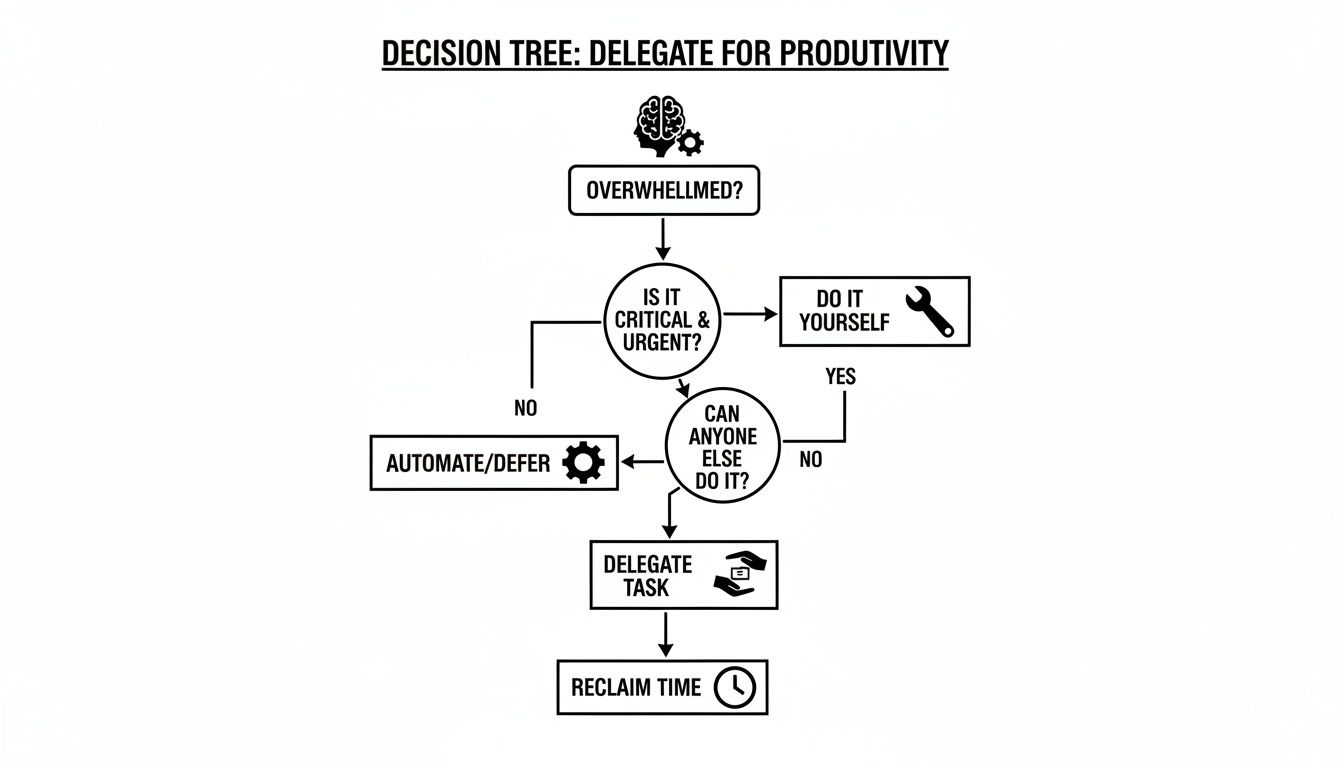
The takeaway here is simple: when your plate is too full, the answer is to take things off it. Delegating is the most direct way to buy back hours you can invest in what really moves the needle.
Creating Simple SOPs That Actually Work
Once you know what you're delegating, you need to define how it gets done. This is where Standard Operating Procedures (SOPs) come in, but don't let the corporate jargon scare you. An SOP can be incredibly simple.
A good SOP is all about removing the guesswork. It’s not about control; it's about empowering your assistant to work confidently and independently. You’re looking for results, not a new person to micromanage.
Honestly, one of the best ways to create an SOP is to just hit record.
Fire up a tool like Loom and make a quick screencast of yourself doing the task. Talk through the process as you do it. This is usually way more effective than some dense, 10-page document nobody will read.
Let's say you're handing off your social media scheduling. Your SOP could be this simple:
- Record a 5-minute video. Show exactly how you log in, where the content comes from, and how you format the posts in your scheduling tool.
- Jot down the essentials. Think login details (shared via a secure password manager, of course!), your preferred posting times, or a short list of must-use hashtags.
- Show them what "done" looks like. Just include a screenshot or link to a perfect, finished post.
That's it. This combo of a quick video and a few notes is all you need for a smooth handoff. Your new VA has everything they need to get started, which means fewer "quick questions" interrupting your day.
If you're still brainstorming what's possible, checking out the most in-demand virtual assistant skills can give you a ton of ideas for building out your first few SOPs.
Finding and Vetting Your Ideal Virtual Assistant

Okay, so you’ve mapped out what to delegate. That’s a huge win. But now comes the part that can feel like searching for a needle in a haystack: finding the right person for the job.
The market for virtual assistants is absolutely booming. Job postings shot up by 35% in the last year alone, and with an estimated 40 million VAs working across the globe, you’ve got an incredible amount of talent to choose from. The challenge isn't a lack of options; it's cutting through the noise to find a perfect fit.
So, where do you even begin? Generally, you have a few different paths you can take.
Navigating the Talent Channels
For many, the first stop is a sprawling freelance marketplace like Upwork or Fiverr. They give you direct access to a massive pool of candidates at every conceivable price point. The downside? The sheer volume can be paralyzing, and you are 100% responsible for the entire process—vetting, interviewing, background checks, and onboarding. It can quickly feel like you’ve taken on a second full-time job.
Another option is to go through a specialized VA agency. These companies do some of the legwork for you by pre-screening candidates, which definitely saves time. But at the end of the day, you're still the one making the final hiring decision and handling the day-to-day management.
Then you have a completely different model: managed services like Approved Lux. Here, you’re not just hiring an individual; you’re subscribing to a service that provides a dedicated, pre-vetted, and professionally managed assistant. All the heavy lifting—recruitment, training, performance reviews, and even providing backup when your primary assistant is away—is handled for you. It's a direct route to reliable, high-quality support. For a closer look at the hiring process itself, our guide on how to hire a personal assistant is a great resource.
Asking Interview Questions That Actually Matter
No matter which path you take, you have to talk to people. A resume can tell you what someone has done, but it can’t tell you how they think. You need to dig deeper with questions that reveal their real-world problem-solving skills, resourcefulness, and professional poise.
Ditch the generic "What are your greatest weaknesses?" and get practical. Throw them a few curveballs based on real situations you face.
- "Imagine you need to book a last-minute flight to London for me, but my preferred airline's website is down for maintenance. What are your next three moves?"
- "You get a Slack message from me late at night that just says, 'Handle the pitch deck for tomorrow.' What specific questions do you ask to get the clarity you need?"
- "Tell me about a time you dropped the ball on a task. How did you catch the mistake, what steps did you take to fix it, and how did you communicate it to your client?"
Their answers here are pure gold. You’re not just testing for skills; you’re looking for a proactive partner who can think on their feet and take initiative.
The Power of the Paid Trial Task
Honestly, this is the single most effective tool in your vetting arsenal. A paid trial task is a small, self-contained project designed to see a candidate in action before you sign a contract. It's the ultimate "show, don't tell" interview.
A trial task is your crystal ball. It gives you a direct glimpse into their communication habits, attention to detail, and ability to follow directions when it actually counts.
Here’s how to set one up for success:
- Pick a Real, but Small, Task: Choose something that directly reflects the work you'll be delegating. A great example is asking them to research three potential venues for a team offsite and organize the findings (cost, capacity, availability) into a simple spreadsheet.
- Provide Crystal-Clear Instructions: Write a mini-SOP for the task. Be explicit about the format, the goal, and what "done" looks like.
- Set a Firm (but Fair) Deadline: A 24-48 hour turnaround is perfect. It’s long enough to be reasonable but short enough to test their time management.
- Always, Always Pay for Their Time: Offer to pay them for the one or two hours it takes, at their stated rate. It's professional, respectful, and shows you value their expertise.
How a candidate handles this test—from the clarifying questions they ask upfront to the polish on the final deliverable—is the best indicator you’ll get of what it will be like to work with them. It’s a tiny investment that can save you a world of headaches later on.
Building a Seamless Onboarding and Communication Workflow

The difference between a VA who just checks off tasks and one who becomes a true partner? It almost always comes down to how you bring them into your world. A messy, “figure it out as you go” start creates confusion and wastes time. But a thoughtful onboarding and communication plan sets the stage for success from day one.
This isn't just about handing over a list of to-dos. It's about integrating a strategic team member who can anticipate your needs and genuinely support your goals.
Think of that first week as laying the critical foundation for your entire working relationship. Your goal is to give your new VA the context, tools, and clarity they need to start winning for you immediately. I’ve seen it happen time and again: a rushed onboarding process guarantees you'll spend more time answering basic questions than you save by delegating.
Your First-Week Onboarding Playbook
A great onboarding process eliminates guesswork and builds your VA’s confidence. Instead of just sending a "welcome aboard" email and hoping for the best, structure the first few days with clear, manageable goals. This gradual ramp-up allows your VA to absorb information without feeling like they’re drinking from a firehose.
Here’s a practical, field-tested sequence for that crucial first week:
-
Day 1: Get The Keys to The Kingdom. Before you talk strategy, get the technical stuff out of the way. Set them up with secure access using a password manager like LastPass. Grant them access to your project management tool, communication app, and anything else they'll need. This is a purely logistical step that clears the path for the real work.
-
Day 2: The Kickoff Call. Now it’s time for a proper face-to-face (over video, of course). This call is your chance to establish rapport and share the "why" behind your business. Walk them through your communication style and key priorities. I always share my screen to give a quick tour of our digital workspace—it helps them visualize how we work.
-
Day 3: The First Easy Wins. Start them with simple, recurring tasks that have crystal-clear SOPs. Think inbox organization, scheduling a few social media posts, or a straightforward data entry job. These are low-risk assignments designed to help them get comfortable with your systems.
-
Day 4: Level Up the Complexity. Once they've got the basics down, introduce a task that requires a bit more brainpower. Maybe it’s researching and summarizing an industry article or finding contact details for a list of potential collaborators. This shows you trust their judgment.
-
Day 5: The Weekly Huddle. Wrap up the week with a quick review call. Talk about what went well, answer any lingering questions, and offer constructive feedback. This simple meeting establishes a regular feedback loop, which is absolutely essential for any successful long-term collaboration.
Choosing Your Collaboration Tech Stack
The right tools are what make remote work feel connected and organized. A chaotic mix of emails, texts, and random DMs is a recipe for missed deadlines and frustration. What you need is a central hub for all communication and task management. Your tech stack doesn't need to be fancy, but it does need to be consistent.
A well-defined tech stack acts as your virtual office. It provides a single source of truth for tasks, deadlines, and conversations, eliminating the "who said what where" confusion that kills productivity.
To make this simple, I’ve put together a table of the essential tools that form a powerful, no-nonsense setup for working effectively with a VA.
Essential Tools for VA Collaboration
| Tool Category | Recommended Tool | Primary Use Case |
|---|---|---|
| Project Management | Asana or Trello | Assigning tasks, setting deadlines, and tracking progress on all projects. Creates a transparent view of the workload. |
| Instant Communication | Slack or Microsoft Teams | Quick questions, daily check-ins, and informal updates. Keeps your email inbox clean for external communication. |
| Secure Password Sharing | LastPass or 1Password | Granting secure access to accounts without ever sharing the actual password. A non-negotiable for security. |
| Document Collaboration | Google Workspace | Creating, sharing, and collaborating on documents, spreadsheets, and presentations in real-time. |
Using a combination like this ensures every part of your workflow has a designated home. For instance, a task request always goes into Asana with a clear deadline, while a quick "Hey, do you have a minute?" can happen in Slack. This discipline is what separates a good VA relationship from a great one.
Setting Clear Communication Expectations
One of the most common friction points I see is mismatched communication expectations. Do you need immediate replies, or is a response within a few hours okay? If you don't define this, you're setting yourself up for frustration.
Establish some clear rules of engagement from the very beginning:
- For Urgent Stuff: Clearly define what an "urgent" request looks like and tell them exactly how to flag it—like a direct message in Slack with an @channel mention.
- For Standard Tasks: Make it a rule that all non-urgent task assignments, questions, and updates live inside your project management tool. This creates a permanent, trackable record.
- The End-of-Day Summary: This is a game-changer. Ask your VA for a brief EOD summary in Slack. A simple bulleted list of "what I did" and "where I'm stuck" gives you total peace of mind without having to micromanage their every move.
By creating this simple structure, you empower your VA to work with confidence and autonomy. They'll know exactly how and when to get in touch, letting them focus on delivering great work instead of guessing what you want.
Measuring Success and Optimizing the Relationship
So, how do you know if bringing on a virtual assistant is actually working? It’s easy to fall into the trap of just counting the hours you’ve saved. But that’s only half the story. The real win isn’t just the time you get back; it's what you do with that time.
The objective isn’t simply to offload your to-do list. It's about building a partnership that directly fuels your professional growth and personal goals. This means shifting your focus from tracking inputs, like hours worked, to measuring the actual outcomes and value created.
This mindset is more crucial than ever. The virtual assistant market is exploding, with forecasts predicting it will grow by a staggering $92.29 billion by 2029, expanding at a compound annual growth rate of 52.3%. Administrative VAs still dominate the field, making up 38.4% of the market's revenue, which just goes to show how vital that foundational support is for any busy professional. You can dive deeper into the numbers in Technavio's latest industry analysis.
Defining Your Key Performance Indicators
To get a true read on your success, you have to look beyond the timesheet. Instead of getting bogged down in administrative tracking, pick a few meaningful Key Performance Indicators (KPIs) that show the real-world impact on your business and your life.
Here are a few powerful KPIs I always recommend clients track:
- Time Reclaimed for High-Value Work: This is the gold standard. How many hours are you now dedicating to strategic planning, nurturing client relationships, or closing deals? These are the activities that administrative drag used to push to the back burner.
- Reduction in Administrative Errors: Keep an eye on the frequency of things like scheduling conflicts, missed follow-ups, or data entry mistakes. A great VA doesn't just do the work; they bring a level of precision that cuts down on costly and frustrating errors.
- Project Completion Velocity: Think about how much faster projects are moving from an idea to a finished product. Your VA can be a force multiplier, handling all the logistical legwork that keeps your initiatives from stalling out.
The most powerful metric isn't how many tasks your VA checks off a list. It's how much mental space and strategic capacity you gain back. That's the real ROI.
Avoiding Common Relationship Pitfalls
Even with the best of intentions, the client-VA relationship can hit a few bumps. From my experience, the two biggest culprits are micromanagement and scope creep. Tackling these head-on is the key to building a partnership that lasts.
Micromanagement usually comes from a lack of trust or, more often, poorly defined SOPs. If you find yourself constantly double-checking their work or just re-doing it yourself, resist the urge to pull the task back. Instead, look at your instructions. Is the desired outcome crystal clear? Did you provide all the necessary context and tools?
Scope creep is that sneaky process where tasks slowly expand beyond what you originally agreed on. The best way to prevent this is with a quick weekly or bi-weekly check-in. It’s the perfect time to review the current task list, prioritize new requests, and make sure their workload is still manageable and aligned with your core objectives.
Transforming Your VA from Reactive to Proactive
Ultimately, the goal is to evolve the relationship beyond a simple task-doer. You want a proactive partner who starts to anticipate your needs before you even have to ask. That transformation doesn't happen overnight; it’s built on a foundation of trust, empowerment, and a commitment to improvement.
Once your VA has a solid handle on their initial responsibilities, start giving them more ownership.
- Delegate the Outcome, Not Just the Task: Instead of saying, "Book my flight to New York," shift your language. Try, "I need to be in New York for a 2 PM meeting on Tuesday; can you handle all the travel logistics?" This gives them the autonomy to find the best flight, book a car, and manage the whole process from end to end.
- Involve Them in Planning: When you're kicking off a new project, bring your VA into the conversation early. Ask for their input on the timeline or where they see potential roadblocks. Giving them that bigger picture helps them contribute in a much more meaningful way.
- Encourage Initiative: Make it clear that you're open to suggestions. If your VA finds a more efficient way to manage your calendar or discovers a new tool that could help, listen. When you empower them to improve your processes, everyone wins.
By actively fostering this kind of growth, you're not just delegating tasks. You're building a powerful operational engine that frees you up to achieve your most important goals.
Common Questions About Outsourcing to a VA
Even after seeing all the benefits, it's smart to have a few questions before you jump in. Bringing someone new into your workflow, even remotely, is a big decision. Let’s tackle some of the most common things people wonder about.
Think of this as your final gut-check before you commit.
How Much Does a Virtual Assistant Cost?
This is the big one, and the honest answer is: it really depends. The price tag is tied directly to the VA's location, their years of experience, and how complex your tasks are.
You might find a VA overseas for basic admin work at around $10 per hour, while a highly specialized, US-based assistant with executive-level skills could command upwards of $75 per hour. It's also common to see monthly retainer packages. For instance, a 20-hour block of time might cost anywhere from $500 to $1,500.
But here’s the real math you should be doing: what is your time worth? If you can offload an hour of work that lets you focus on something that actually grows your business, the investment pays for itself almost instantly.
Services like Approved Lux flip this model on its head. Instead of buying a block of hours, you get access to a team for a flat monthly fee. The entire focus shifts from tracking time to getting the results you need.
How Do I Handle Security and Share Passwords?
Security is non-negotiable. Please, never send a password through email or a chat message. The gold standard in this space is using a dedicated password manager.
Tools like LastPass or 1Password are absolutely essential. They let you share access to specific accounts without ever actually revealing your password. Your VA gets a login, but you keep control.
For documents, stick to secure cloud platforms with granular permission settings, like Google Drive or Dropbox. It's also a good idea to have a non-disclosure agreement (NDA) in place right from the start, especially if your VA is going to be handling sensitive company data or personal information.
What Is the Difference Between a VA and an EA?
The lines have definitely blurred over the years, but there's still a traditional distinction. An Executive Assistant (EA) is usually a full-time, in-house employee dedicated to one specific executive. They handle high-level strategic support and act as a gatekeeper.
A Virtual Assistant (VA), on the other hand, works remotely and often supports several clients at once across a huge range of tasks. If you're just getting started with this concept, it’s worth taking a moment to understand What Is a Virtual Assistant? and the sheer variety of what they can do.
That said, many top-tier VAs today are essentially virtual EAs, offering the same high-level support. The real difference is the employment model—an EA comes with salary, benefits, and overhead, while a VA is a contractor or part of a service, giving you way more flexibility and a much better handle on costs.
What if I Am Not Satisfied With My VA?
Before you make any big moves, take a look at your own instructions. More often than not, performance issues come down to a simple miscommunication or an unclear brief. Always start with direct, constructive feedback. Show specific examples of what went wrong and give them a chance to adjust.
If the issues persist even after you’ve tried to get back on track, then it might be time to part ways. This is honestly one of the biggest advantages of outsourcing—you can end a contract without the headache and legal tape of firing a traditional employee.
This gets even easier if you're working with a managed service. You don't have to have the awkward conversation yourself. You just let your account manager know what's happening, and they'll either coach the assistant or simply assign a new, better-fit professional to your account. No starting your search all over again from square one.
Ready to stop managing tasks and start focusing on what truly matters? With Approved Lux Personal Assistant, you get a dedicated, pre-vetted operations layer for your life without the burden of hiring or managing staff. Let our team handle the logistics while you reclaim your time and mental clarity.
Want the wider view?
Ten categories. One report. Every quarter. The Approved List tracks what's rising and what's fading: data-backed signals, not opinions.
Free to join · Delivered by email