All Articles
The Journal
Supporting Schedule Templates: Plan Around Changes
October 27, 202615 min readbackup coveragecaregiver scheduling
Learn what a supporting schedule is and copy backup, travel, caregiver and household templates with buffer times that keep your week on track when plans shift.
It's Tuesday, and school pickup lands on the same afternoon as a client call you can't casually move. Your calendar shows the clash perfectly. What it doesn't show is who's collecting your child, when that person needs confirmation, or who will contact the client if the backup falls through.
You don't need another place to record the problem. You need a supporting schedule that names who acts before you have to interrupt your work.
What a Supporting Schedule Is and Why It Matters
A supporting schedule is the planned backup layer beneath your main calendar. It holds named cover, buffer time, dependencies, and a fallback for commitments that can't slip. The important difference is ownership: someone is responsible for moving each obligation from planned to completed.
Think of a theater production. The main calendar is the lead performer. The supporting schedule contains the understudy's preparation and the stage manager's instructions, so someone can step in without stopping the show.
The visible calendar can stay simple. Keep the operating details in a shared Google Sheet, an Outlook event's notes, or a household task board, with a link from the relevant appointment.

The coverage beneath the appointment
A usable supporting schedule has distinct coverage layers:
- Backup coverage: Someone can take over a pickup, signature, or meeting when the primary person becomes unavailable.
- Caregiver overlap: Incoming and outgoing caregivers have time to exchange information before responsibility changes.
- Travel buffers: Transfers, connections, and arrival commitments include recovery room.
- Recurring household coordination: Forms, bookings, renewals, and service visits have owners and follow-through.
A standard calendar records what's planned. It rarely records whether the backup agreed, whether the driver has the address, or whether the appointment requires paperwork first. Those omissions turn an ordinary change into an urgent interruption.
A backup name isn't coverage until that person has accepted the responsibility and knows when to act.
When the extra layer earns its keep
Don't build an elaborate control system for a week with flexible, independent commitments. Start where failure would force someone else to abandon work or leave an obligation uncovered.
Your week needs a supporting schedule when:
- One person is indispensable: Several commitments fail if that person becomes unavailable.
- Travel includes connections: A delay can affect later transport, meetings, or family responsibilities.
- Dependents have fixed times: Two or more people need collection, transport, supervision, or attendance that can't easily move.
The objective isn't a fuller calendar. It's fewer moments when everyone assumes someone else is handling the problem.
Templates for the Four Coverage Layers
Supporting schedule templates by coverage layer
Use these as sample starting settings, then adjust them to actual routes, provider requirements, and availability.
| Layer | What it protects | Starting buffer or fallback | Sample entry |
|---|---|---|---|
| Backup coverage | Single pickups, signings, meeting hosting | Named backup; fallback activates if primary hasn't confirmed by 2:15 p.m. | Pickup 3:15 p.m., primary Dana, backup Marcus, confirm by 2:15 p.m. |
| Caregiver overlap | Handoffs between caregivers for a parent or child | 15 to 30 minute overlap at each handoff | Incoming caregiver arrives 4:45 p.m.; outgoing caregiver leaves 5:15 p.m.; household coordinator checks acceptance before departure |
| Travel buffer | Flights, ground transport, time-zone shifts | Start with 45 minutes before an across-town commitment and airport arrival two hours before a domestic departure | Departure 6:10 p.m., car booked for 4:30 p.m., rideshare alternate noted; move car earlier if route time won't preserve airport buffer |
| Recurring household coordination | Appointments, forms, renewals, service windows | Lead time 2 to 4 weeks; second-available slot within 3 days | Pediatrician well visit booked 3 weeks ahead, second slot within 3 days as fallback |
Complete the operating fields
Each row is a template line, not a finished plan. Add an owner who monitors it, a primary person or arrangement, a fallback, and the time after which the fallback activates. For appointments, also record who can approve a change.
The owner and primary can be different people. Dana might perform the pickup while a household coordinator checks confirmation and activates Marcus if necessary. That distinction prevents the unavailable person from remaining responsible for arranging their own rescue.
For caregiver coverage, choose an arrangement that can realistically sustain the handoffs. Superstar Nannies' guide can help you find the right nanny arrangement before you assign coverage that a live-out, live-in, or rotating arrangement can't provide.
Tune slack instead of maximizing it
For an initial trial, review the entries after two weeks. Log which buffers went unused, which prevented a collision, and which were too short. Shorten unused buffers cautiously rather than treating every uneventful journey as proof that slack was unnecessary.
Don't give every appointment the same cushion. A nearby recurring meeting and an airport transfer have different failure consequences. Protect the expensive failure, not merely the longest event.
A dual-career family might combine pickup backup, caregiver overlap, a parent's airport transfer, and school-form tracking in the same week. An executive might combine a substitute meeting host, coverage for a dependent parent, flight alternatives, and home-maintenance access while away.
The layers can share a tool, but they shouldn't share vague ownership. Each needs a person who can act when its specific trigger occurs.
Who Owns the Decisions Behind the Calendar
Adding another shared calendar can increase mental load if the same person still interprets every conflict and chases every response. You've distributed visibility, not responsibility.
In KPMG's survey of 1,000 U.S. working parents, 54% frequently experienced clashes between work and parenting schedules, while 57% identified time management as a major challenge. Recording those collisions doesn't decide what happens next.
Separate judgment from execution
Keep judgment-heavy decisions with the member unless they've explicitly delegated authority. These include priority tradeoffs, which child or parent takes precedence, sensitive messages, and relationship context that could change the meaning of a seemingly routine choice.
Move repeatable execution to a delegate:
- Booking and rescheduling: Find available slots within approved constraints.
- Confirmations and reminders: Verify acceptance, requirements, and attendance.
- Vendor shortlists: Compare suitable options rather than forwarding unfiltered search results.
- Itinerary changes and follow-ups: Carry out approved changes and chase missing responses.
For every open loop, ask: Who decides? Who executes? Who confirms it's closed? Put names beside those questions. A school appointment isn't closed merely because someone requested it; the slot must be accepted, transport arranged, and any required documents accounted for.
Delegate the outcome and its boundaries, not just the first email.
Give the delegate usable context
A shared context file should record preferences, hard constraints, authorized contacts, and access standards. Specify which calendars can be edited, which information can be shared, and which actions require approval. Use delegated account permissions rather than passing passwords through messages.
Our members get an Assistant team rather than one assigned person, so requests remain covered when a team member is off. Shared context supports that continuity without requiring the member to repeat the same background.
Proactive Preference Learning means recording confirmed decisions, such as preferred vendors, pickup partners, airlines, and seat choices, so routine selections can follow that record without another question. Make monthly preference review part of your operating routine, removing choices that no longer apply rather than allowing old assumptions to become permanent instructions.
This is a first hire without overhead: a force multiplier for operational noise reduction, not a reason to surrender sensitive decisions. The advantage comes from transferring the booking, chasing, and completion work while keeping a clear boundary around judgment.
Calendars can place events. A responsible human must still negotiate competing priorities and resolve exceptions.
Build Your First Supporting Schedule This Week
-
List recurring dependencies. Set aside a focused sitting to capture the next 90 days: school commitments, recurring meetings, travel, care arrangements, renewals, and household service needs. Include preparation tasks that aren't currently on the calendar.
-
Sort by coverage layer. Assign each dependency to backup coverage, caregiver overlap, travel buffers, or recurring household coordination. Give cross-cutting items one accountable owner rather than duplicating them across separate lists.
-
Set a buffer for timed items. Apply the sample starting settings to a trial week. Work backward from the required arrival time, including parking, check-in, access, or document collection.
-
Name a backup. Address every single point of failure. Confirm that the backup has agreed and has the information or permission needed to act.
-
Mark the authority boundary. Label each open loop member-decided or delegated. Add constraints such as acceptable days, approved contacts, and spending authorization.
-
Write the escalation rule. Specify which changes reach the member and through which channel. Separate an informational update from a decision request that needs a response.
-
Review after two weeks. Move unused buffers where appropriate, extend inadequate ones, and investigate any task that stayed open because ownership was unclear.
Use the checklist as a setup prompt, then record the operating details in your shared tracker.
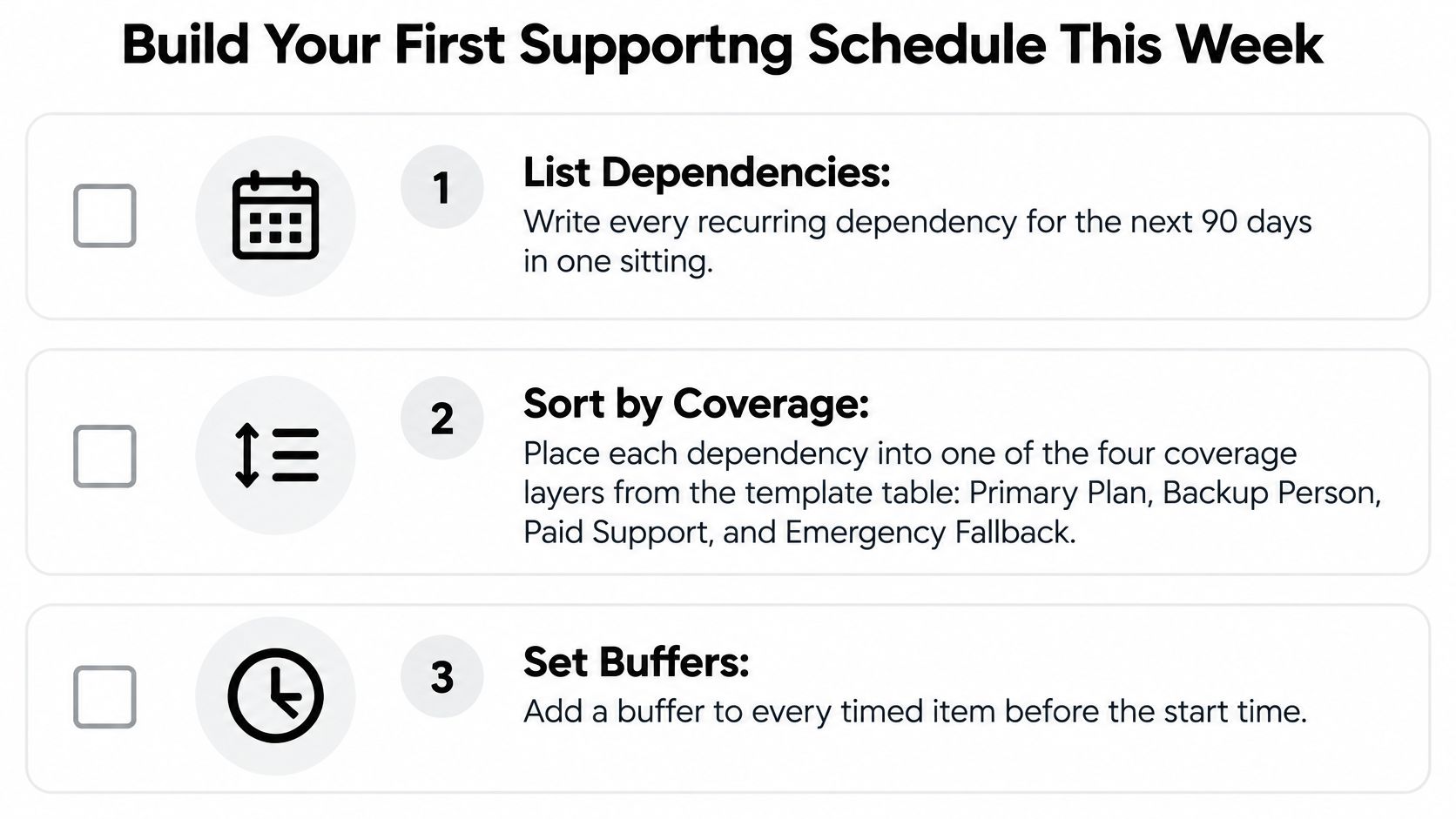
Check readiness before the week starts
Every line needs a named owner, a named backup, and a deadline. Test access as well: can the backup find the address, contact the school, or retrieve the form without asking you?
If rigid routines make planning harder, Jan Kutschera's guidance on how to create structure without stifling creativity offers a useful perspective. Keep the controls around commitments and handoffs, while leaving flexibility in how discretionary work gets done.
Choose who runs the system
You can operate the schedule yourself or delegate its maintenance. Approved Lux provides a US-based Assistant team reachable around the clock by call, text, or email through Triple-channel access, with all channels monitored at equal priority.
Our team books, reschedules, and de-conflicts appointments, and sends deadline reminders before they fall due. Lux Solo and Lux Circle are month-to-month plans that can be cancelled at any time. The operational choice is whether you want to keep owning the follow-through or transfer that work.
How the Schedule Absorbs a Disrupted Day
Say your 7:10 a.m. flight is delayed to 11:40 a.m. You now can't reliably make a noon investor call or a 1:00 p.m. school pickup. Without a supporting schedule, you'd start contacting people from the airport while trying to understand your travel options.
With prepared fallbacks, the person monitoring the itinerary can begin work before you finish speaking to the airline. They don't need permission to identify the affected commitments or check whether approved alternatives remain available.
The sequence below shows how a delay becomes a controlled set of actions rather than a full-day rebuild.
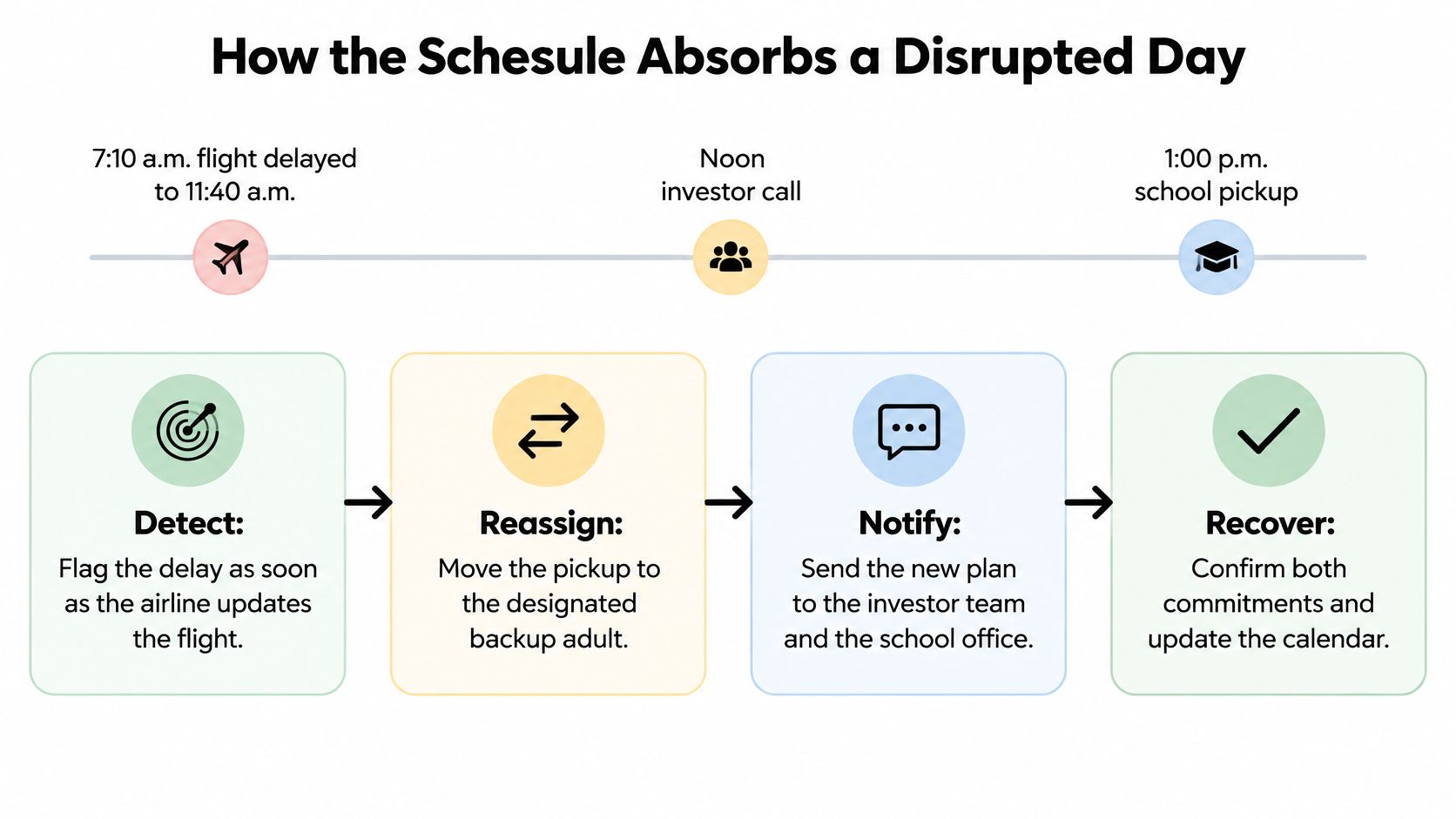
Detect, absorb, escalate, and close
-
Detect the change. The itinerary owner receives the airline update and checks the flight status. They identify downstream conflicts rather than treating the delay as an isolated travel problem.
-
Absorb the impact. The pickup moves to the designated backup adult, subject to their confirmation and school authorization. The meeting coordinator checks the investor team's fallback window and holds it while the decision is pending.
-
Escalate the actual decision. You receive a concise choice: preserve the later flight and move the investor call, or consider another travel option with its cost and consequences. Routine coordination continues without waiting for your response.
-
Close every affected loop. The owner confirms pickup acceptance, notifies the school as appropriate, obtains agreement on the meeting change, and updates the calendar. A sent message isn't closure if nobody has accepted the new responsibility.
Why contingencies beat a rigid sequence
UCLA Anderson Review reports that traditional time management becomes ineffective when interruptions are high, defined in the cited study as 4.11 or more on a 1–7 interruption scale, while contingent planning remains positively associated with employee engagement and productivity across interruption levels. That threshold is a study measure, not a count of interruptions during your day.
The practical distinction is preparation for deviation. A rigid itinerary tells everyone what should happen; a contingent plan gives the responsible people permission and information to handle what happens instead.
Keep a compact disruption log with:
- Independent resolution: The share of disrupted commitments resolved without member intervention.
- Time reclaimed: Member hours returned after accounting for questions and handoff work.
- Early prevention: Conflicts caught before they became urgent.
Don't reward silent action that exceeds authority. Whether a later flight is worth losing an important meeting remains your decision unless you've established a rule for that tradeoff. The delegate should present the options and execute the choice, not guess at strategic importance.
Household Templates for Working Parents
BLS daily time-use figures for 2024 show that employed adults whose youngest household child was under six averaged 4.98 hours on work and work-related activities, 2.23 hours caring for and helping household members, 1.82 hours on household activities, 0.60 hours purchasing goods and services, and 2.97 hours on leisure and sports per day.
The chart highlights the larger blocks competing for attention.
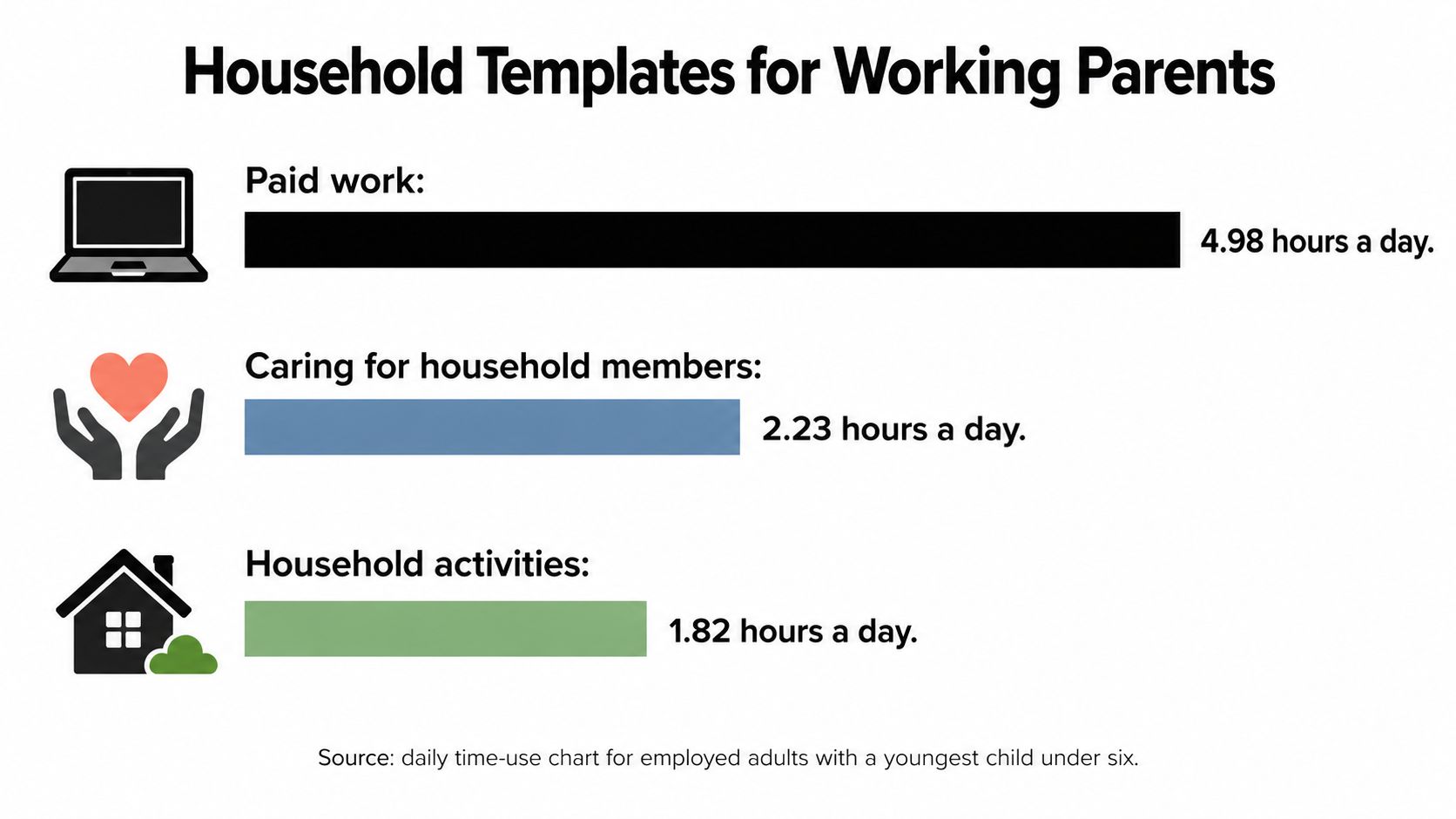
These are daily averages, not a proposed workday. Within any household's blocks, booking messages, forms, and provider callbacks can fragment the time available for concentrated work or rest.
Put recurring work in one queue
Recurring household items with cadence and fallback
The following is a sample household template, with planning settings to adjust to provider availability and actual deadlines.
| Item | Cadence | Lead time | Fallback |
|---|---|---|---|
| Pediatrician visits (well and sick) | Annual well visit; sick visits as needed | Well visits 2 to 4 weeks ahead; sick visits same day | Second-available slot within 3 days |
| School forms and enrollment | Each term | Two weeks before the deadline | Named second signer; copy stored in shared folder |
| Summer camp registration | Yearly | Alert set 1 week before opening | Waitlist plus two alternate camps |
| Birthday party planning | Per event | 3 to 4 weeks ahead | Two vetted venues |
| Home maintenance and service windows | Quarterly | 7 to 10 days ahead | Second vendor vetted in advance |
| Renewals and document deadlines | Per renewal | 30 days before due date | Reminder sent to both adults |
Use one shared household queue rather than separate private lists. For this sample routine, schedule a monthly sweep of the next 90 days for renewals, camp openings, and school deadlines. Our guide to working-mother time management provides complementary ways to organize the workload around available bandwidth.
Batch coordination without delaying care
Suppose the queue contains a sick-visit request for 8:15 a.m. and a school form due Friday. The coordinator requests the appointment, records the second-available slot within three days if the first is taken, and names the form's signer before sending the reminder. Any delay in care must follow the healthcare provider's guidance, not the convenience of the scheduling template.
For holiday weeks, bring availability checks forward. Treat two to four weeks as an initial planning window for routine appointments and camp preparation, but follow published registration dates when they open earlier.
Use this video alongside a household planning conversation.
Measure evenings and weekend hours recovered per week, not just tasks completed. A long completed-task list isn't useful if a parent still spends Sunday chasing every unfinished detail.
Caregiver Overlap Templates and Where Support Stops
The 2025 Caregiving in the U.S. report found that 63 million American adults, nearly one in four, provided ongoing care to an adult or child with a medical condition or disability during the prior year. In the same report, caregivers averaged 27 hours of care weekly, and 24% provided 40 or more hours.
Care coordination needs explicit handoffs because an incomplete message can affect someone else's ability to provide care.
Use a handoff record, not recollection
Build the caregiver template around:
- Handoff notes: Record medication times from authorized instructions, completed activities, and questions for the appropriate professional.
- Overlap: In a sample arrangement, reserve 15 to 30 minutes for the incoming and outgoing caregivers to exchange information.
- Appointments and transport: Name who accompanies the person and who confirms the ride.
- Documents and service windows: Track requested forms, recipients, access arrangements, and outstanding responses.
Say a parent's pharmacy refill is due Thursday, a teen has an orthodontist visit Friday, and a sibling needs discharge paperwork by the weekend. Assign separate execution owners, then identify who may discuss private information with each provider. A shared deadline alone doesn't establish permission.
Clear sibling communication helps distribute that work without assuming the nearest relative is automatically responsible.
Keep the boundary administrative
Our Assistant team doesn't act as house sitters or in-home caregivers. We find, vet, and schedule the people who do.
The schedule organizes logistics, reminders, and information. It doesn't provide medical, legal, insurance, or financial advice, and it doesn't authorize anyone to interpret treatment instructions.
More shared calendars won't fix an unassigned handoff, and a complete schedule can't replace clinical or legal judgment.
Executive and Traveler Templates for the Road
The 2025 executive productivity report summarized by Prialto found approximately 8–12 hours per week devoted to non-specialized tasks; separate reporting summarized there put growth-stage entrepreneurs' administration at an average of 36% of their working week, more than 16 hours out of a 45.5-hour week. These describe different groups, not interchangeable estimates.
For a hypothetical executive carrying that weekly load across 48 working weeks, the annual exposure would be 384–576 hours. That's a planning calculation, not an estimate of what any individual will recover through delegation.
Run a weekly executive block
- Triage the inbox into act now and delegate, keeping sensitive negotiations with the executive.
- Prepare meeting packets for the next five working days, including the decision needed and missing information.
- Place calendar holds for the next two weeks before offering availability externally.
- Log expenses while receipts and business context are accessible.
- Produce a Friday decision list, giving two workable options and their costs for each unresolved choice.
Those time horizons are sample operating settings. Adjust them to the executive's meeting volume rather than producing preparation nobody uses.
If work crosses locations and collaborators, Mazurly's guide to choosing a tracker for location-independent work can help you select where owners, deadlines, and status remain visible. Keep sensitive details behind appropriate access controls.
Prepare the travel operating sheet
For a sample trip, record these in order:
- Primary flight and backup option, including what would trigger consideration of the alternative.
- Ground transfer with a 45-minute pickup buffer, adjusted to the route and arrival conditions.
- Hotel and restaurant alternates, checked for suitability rather than merely listed.
- One contact for midnight changes across time zones, with authority boundaries documented.
Our business travel planning guide offers further itinerary preparation. The delegate handles rebooking logistics and presents viable options; the executive chooses when cost, relationships, or strategic priorities are involved.
Compare the hours handed off with the strategic value of those hours and the time still spent supervising. Delegation doesn't pay when the handoff requires more explanation than execution, or when a sensitive negotiation genuinely needs the executive's personal involvement.
Approved Lux Personal Assistant offers human support for the booking, coordination, and follow-through beneath a busy calendar. Visit Approved Lux Personal Assistant if you want to transfer those open loops to an Assistant team while keeping control of the decisions that matter.
Want the wider view?
Ten categories. One report. Every quarter. The Approved List tracks what's rising and what's fading: data-backed signals, not opinions.
Free to join · Delivered by email