All Articles
The Journal
What Is Email Management and How It Reclaims Hours
September 21, 202614 min reademail management tipsinbox triage
What is email management? Learn inbox triage, batching and delegation to reclaim hours and reduce cognitive load with a smarter system.
You open your laptop to “get ahead” before the first meeting. Overnight, the inbox filled with client replies, calendar changes, a school message, a vendor question, and three threads where nobody is sure who owns the next step. You answer two quick emails, then a notification pulls you into a different thread. Ten minutes later, you're searching for an attachment, wondering whether you already replied, and trying to remember what you meant to work on first.
That's why your inbox feels like a second job.
For many professionals, email isn't a communication tool anymore. It's a hidden operations layer. It holds approvals, requests, scheduling, status updates, decisions, and loose ends. When that layer has no structure, the day gets chopped into fragments. Important work starts later, follow-ups slip, and the mental load lingers after hours.
People often get confused. They think email management means color-coding folders, chasing inbox zero, or becoming faster at clearing messages. Those habits can help, but they don't solve the problem. The problem is interruption cost and decision fatigue. Your inbox keeps asking, “Do this now? Later? Delegate it? Ignore it? Track it? Reply how?”
If that constant sorting is leaving you mentally fried, it's closely related to the broader problem of cognitive overload. The inbox is often where that overload becomes visible.
Introduction Why Your Inbox Feels Like a Second Job
A lot of inbox stress starts before the first real task of the day.
You sit down intending to finish a proposal, review a budget, or prep for a call. Instead, email grabs control. One message needs a reply. Another needs research. A third needs a decision from someone else, but you know that if you don't push it forward, it will stall. By mid-morning, you've been busy the whole time, yet the important work hasn't moved.
That feeling isn't imaginary. Inbox work takes a large share of professional time. McKinsey Global Institute reported that knowledge workers spend about 28% of the workweek managing email, which works out to roughly 11.2 hours in a 40-hour week and about 2.6 hours in a 9-hour workday according to these email workload figures. The same source cites later Microsoft workplace research showing the heaviest email users spend 8.8 hours a week on email, while the average worker receives 117 emails per day.
That explains why “just checking email” rarely stays small.
The hidden work inside the inbox
Many count only the time spent reading and replying. They don't count the extra work wrapped around each message:
- Triage decisions: Is this urgent, important, or noise?
- Ownership decisions: Should you handle it, forward it, or wait?
- Search effort: Where's that file, thread, or earlier promise?
- Follow-up drag: Who still owes a reply, and when do you chase it?
- Context switching: What were you doing before this email pulled you off track?
Email problems usually aren't about message volume alone. They're about the number of decisions each message creates.
That's why willpower isn't enough. You can't out-discipline a system that keeps interrupting you and making you re-decide the same things every day.
A calmer inbox starts when you stop treating email as a personal habit problem and start treating it as an operational system. That shift changes everything. Instead of asking, “How do I clear my inbox faster?” you ask, “How do I route, reduce, and resolve email work without letting it run the day?”
What Email Management Really Means Beyond Sorting Messages
Email management is easy to misunderstand because the phrase sounds smaller than it is.
Many people hear it and think folders, flags, or an afternoon cleanup session. Those are tools, not the full practice. A better definition starts with workflow.
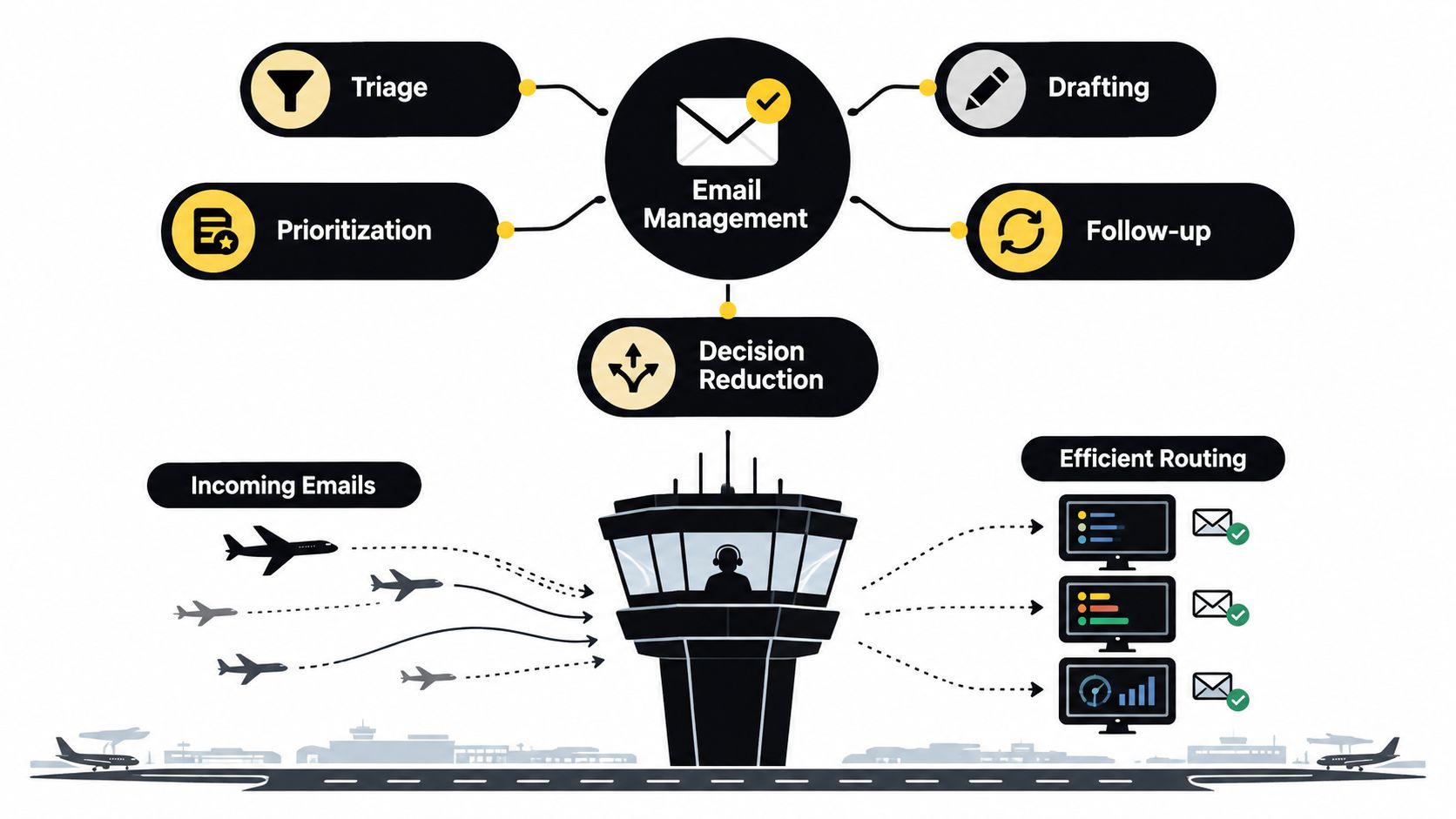
Email management is the operating system you use to triage, prioritize, draft, follow up, and reduce decisions inside your inbox.
Think air traffic control, not a pile of letters
A useful analogy is air traffic control.
Planes keep arriving. Some can land now. Some need to circle. Some should be redirected. Some carry passengers who need immediate attention. The tower's job isn't to admire the planes. It's to keep traffic moving safely, in order, and with as few avoidable delays as possible.
That's what good email management does. It creates rules for what gets handled now, what gets queued, what gets delegated, and what never needed your attention in the first place.
Checking email is passive. Managing email is active.
How email became a workflow problem
This wasn't always true. The first electronic mail message is widely dated to 1971, when Ray Tomlinson sent network mail over ARPANET and introduced the @ convention for addressing users on remote hosts, as summarized in this history of email overload and inbox change. Later, a major shift came in 2004, when Gmail launched with 1 GB of free storage, fast search, conversation threading, and labels.
Those features changed user expectations. Email stopped being a simple transport tool and became a searchable work archive. That made inboxes more powerful, but it also made them stickier. Decisions, attachments, approvals, and follow-ups all started living in one place.
What sits inside a real email system
When people ask what is email management, they usually need a plain answer. Here it is:
- Triage: deciding what matters first
- Prioritization: separating urgent from important
- Drafting: replying clearly and consistently
- Follow-up: making sure open loops close
- Decision reduction: using rules, templates, and routines so you don't rethink every message
If your work also depends on whether messages arrive successfully in the first place, it helps to understand related concepts like what is email deliverability, especially for client outreach, marketing, or account communication.
A well-managed inbox doesn't mean you're always in email. It means email no longer controls when you think.
The Hidden Cost of Email Overload on Focus and Health
The biggest damage from email often comes from timing, not volume.
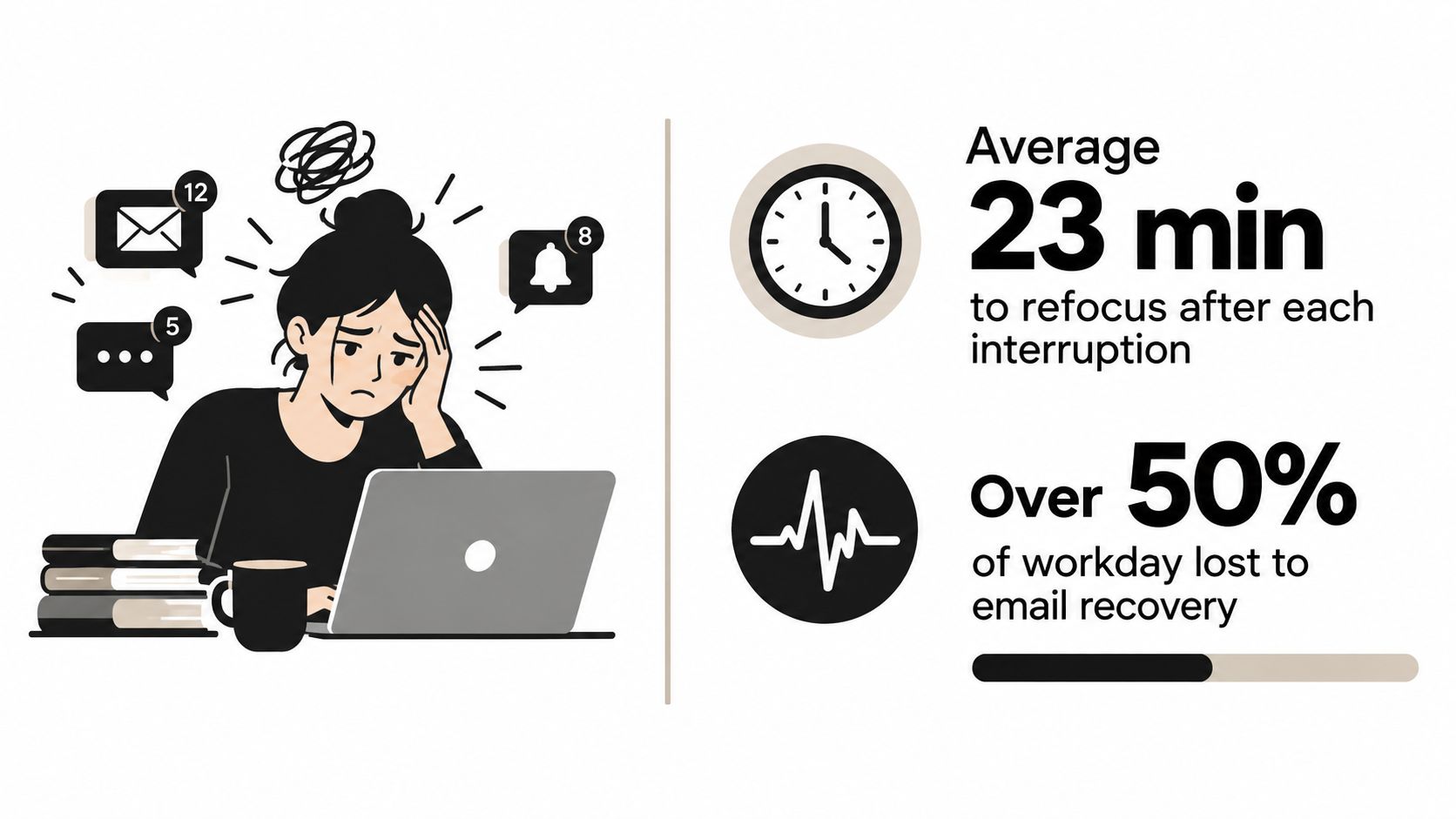
A single message can be harmless. A day full of interruptions isn't. The problem is that each alert, preview, and “quick reply” breaks concentration, forces a decision, and leaves residue behind when you try to return to your original task.
Why focus collapses so quickly
One study found employees responded to a new email notification in an average of 1 minute 44 seconds, with 70% reacting within 6 seconds and 85% within 2 minutes. After each email interruption, it took an average of 64 seconds to recover back to the prior work rate, according to research on email interaction and productivity.
That sequence is what drains the day. You're not only reading the email. You're leaving one task, entering another, then climbing back into the first task again.
A separate office-simulation study made this effect more concrete. In the continual-email condition, messages arrived about every 4 minutes and participants had only 10 seconds to begin responding, which isolated the mechanics of interruption pressure in this controlled study of email interruptions.
Stress doesn't stay in the inbox
The cost isn't just productivity.
Microsoft researchers reported that the more time employees spent on email during the day, the lower their perceived productivity and the higher their stress levels. The same research found notification-driven checking was associated with lower productivity than self-initiated checking, as described in Microsoft's study on email, stress, and work patterns.
Industry reporting also notes that feeling overloaded by work email has been linked to worse physical health, worse psychological health, increased presenteeism, and lower self-rated productivity in this email industry report overview.
Operational insight: An inbox isn't just a message list. It's a trigger system. If you let it interrupt you on its own schedule, it will keep trading your attention for tiny decisions all day.
What this means in practical terms
If email leaves you tired, the answer usually isn't “reply faster.” It's to change the mechanics.
A few examples:
- Turn off intrusive alerts: Don't let every message become a command.
- Batch inbox checks: Give email a place in the day instead of letting it sprawl across the day.
- Use quick-view triage: Sender, subject, and first lines are often enough to sort before opening.
- Reduce unnecessary thread churn: Especially reply-all habits that create extra noise.
Those changes matter because email overload is a systems problem. Focus improves when the system stops interrupting you by default.
Core Components That Make Email Management Work
A workable inbox system has a few parts, but they need to connect. If you only label messages without changing when you check them, interruptions still win. If you batch email but don't track follow-up, important threads still disappear.
The goal is an operating rhythm, not a prettier inbox.
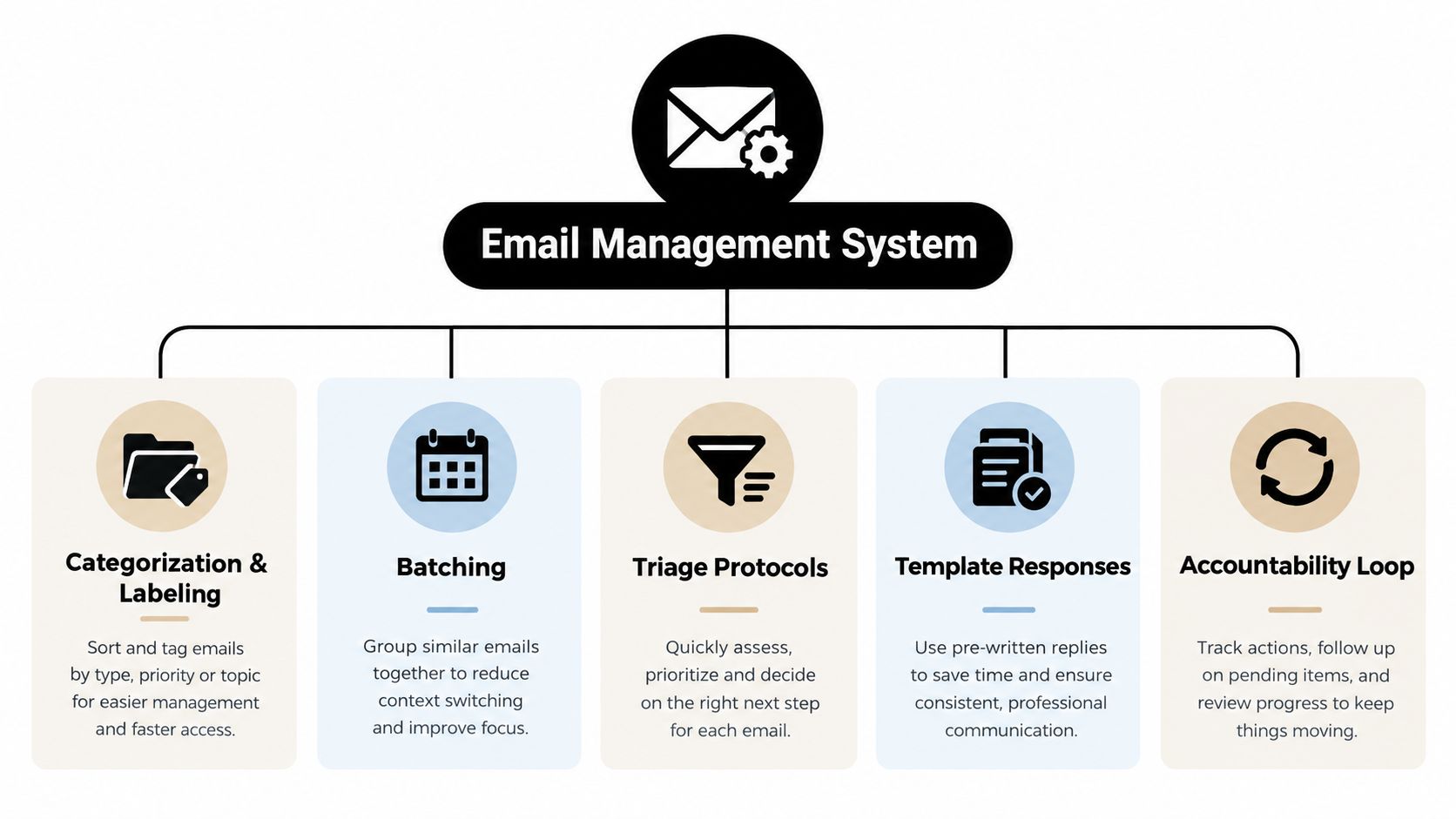
Categorization and labeling
Start with fewer categories than you think you need.
A common tendency is to overbuild folders and underuse them. A better approach is broad labels that answer simple routing questions such as action, waiting, reference, finance, client, or personal. The point isn't perfect organization. The point is faster decisions.
A practical example: when an invoice hits your inbox, it shouldn't sit next to a client issue and a school notice as if all three require the same kind of attention. Labels separate message types so your brain doesn't have to.
Batching and check windows
Research on e-mail interruptions recommended dedicated email windows three times a day, around 9 a.m., 1 p.m., and 4:30 p.m., with each session capped at 30 minutes in this study on managing e-mail interruptions.
That schedule won't fit every role exactly, but the principle is strong. Email works better in blocks than in drips.
Try one simple rule for a week: no checking between work blocks unless you're expecting something genuinely time-sensitive.
If your role includes risk-sensitive messages, it's also worth tightening your defenses with tools and policies. This overview of Email Security Tools is useful if part of your inbox chaos comes from suspicious messages, phishing attempts, or avoidable verification work.
Triage protocols and ownership
Every incoming email should meet a clear decision path.
Here's a lightweight version:
- Respond now if the reply is short and important.
- Queue it if it needs thought, research, or writing time.
- Delegate it if someone else is the right owner.
- Track it if you're waiting on another person.
- Archive it if no action is needed.
Many inboxes fail. People read an email, leave it open, and hope they'll remember it later. That's not a system. That's borrowed stress.
Templates and repeatable replies
If you type the same kind of message often, save it.
Meeting confirmations, document requests, scheduling replies, gentle follow-ups, and status acknowledgments are all good candidates. Templates reduce typing time, and they reduce micro-decisions about wording and tone.
For examples you can adapt, these professional email templates are helpful starting points.
Follow-up tracking and accountability
Some emails are done when you hit send. Many aren't.
A proposal sent, a vendor contacted, a parent-teacher form requested, a client approval pending. These all require an accountability loop. You need a place to note who owes what and when you'll check back.
- Use a waiting label or folder: Keep pending items visible.
- Set a review habit: Scan waiting items during one of your email windows.
- Move commitments out of the inbox: Add due dates to your task list or calendar when needed.
That's the full system. Categorize so triage becomes easier. Batch so interruptions drop. Delegate where ownership belongs elsewhere. Use templates to cut repeat decisions. Track follow-ups so the inbox stops acting like your memory.
From DIY Habits to Delegated Inbox Triage
Personal habits help, but they have a ceiling.
At some point, the issue isn't that you need a better folder structure. The issue is that too much low-value email still lands on your desk first. You're still the first reader, first sorter, first drafter, and first follow-up engine. That means your best attention gets spent on routing work instead of doing work.

Where DIY starts to break
A founder, physician, consultant, or dual-career parent can build a decent solo system. But solo systems reset every morning. You still need to reopen threads, remember preferences, and decide how to handle recurring requests.
Delegated triage changes that model. Instead of asking, “How can I personally process all of this better?” you ask, “What should reach me, in what form, and after what filtering?”
That's the difference between productivity tactics and strategic advantage.
What delegated triage actually looks like
A delegated model can include:
- First-pass triage: Someone sorts incoming messages by urgency and category
- Draft support: Routine responses get prepared for review
- Follow-up handling: Open loops are chased without you remembering each one
- Scheduling coordination: Calendar-related threads get routed and resolved
- Preference-based decisions: Repeated choices get handled using your standards
A service like Approved Lux fits as one operational option. It offers a US-based Assistant team with Triple-channel access by call, text, or email, and supports inbox triage, drafting, and follow-up inside broader admin workflows. The operational advantage is Proactive Preference Learning, where the team learns your routines, tone, and priorities over time so email handling improves instead of restarting from zero each day.
For a deeper look at this model, see how an email management virtual assistant approach works in practice.
Handle, batch, or delegate
The easiest way to decide what belongs where is to sort by judgment and repeatability.
| Email Type | Best Action | Why It Saves Time |
|---|---|---|
| Quick approval request | Handle | Fast decision, low setup cost |
| Newsletter or non-urgent update | Batch | Doesn't deserve live attention |
| Scheduling thread with multiple people | Delegate | Back-and-forth coordination is time-heavy |
| Vendor follow-up | Delegate | Repetitive chasing doesn't need your focus |
| Sensitive relationship email | Handle | Tone and judgment matter most |
| Status check or routine acknowledgment | Template or delegate | Repeatable language reduces friction |
| Research-based reply | Batch | Needs focused thinking, not interruption-time handling |
A short walkthrough helps make that real.
Delegation also solves a trust problem that often slows people down. Many professionals hesitate because they picture a generic offshore setup with weak context and uneven accountability. A US-based Assistant team changes that calculus for work that requires nuance, discretion, and clear ownership.
Delegation works when you're not outsourcing your judgment. You're routing the repetitive parts away from it.
Real World Examples of Email Management in Action
The easiest way to understand email management is to watch it solve everyday messes.
Founder with investor and vendor threads
A founder starts each day with product decisions to make, but the inbox is full of investor scheduling, legal back-and-forth, recruiting coordination, and vendor questions. Before using a system, every message lands directly on the founder's plate. The result is fragmented mornings and delayed strategic work.
With a real system, investor messages get flagged first, vendor questions are grouped, routine replies use saved language, and waiting items get tracked outside memory. The founder only sees what requires judgment. Everything else gets routed, drafted, or queued.
The visible change isn't a spotless inbox. It's that the founder reaches deep work before the day gets hijacked.
Dual-career parent with school and care logistics
A parent finishes paid work, then starts the second shift. School emails, pediatrician forms, summer camp confirmations, birthday RSVPs, and household vendor threads all live in the same inbox as work. Important family tasks don't look urgent until they become urgent.
An email system changes the shape of the evening. School and care messages get labeled by type. Appointment requests move into a scheduling lane. Reusable replies handle common confirmations. Follow-up items sit in a waiting view instead of in mental storage.
The parent stops scanning the whole inbox to remember family logistics. The system holds the moving pieces.
A good email process doesn't just save time at work. It reduces the after-hours drag of unfinished coordination.
Frequent traveler with disruption risk
A traveling professional often lives inside confirmation emails, hotel updates, calendar changes, and last-minute airline notices. One cancellation can trigger a chain reaction across ground transport, meeting times, and dinner plans.
Without a system, that person keeps checking email defensively. With a system, travel-related messages are easy to surface, urgent threads are separated from reference details, and rerouting tasks can be handled without searching six different confirmations.
The benefit is mental steadiness. The traveler doesn't need to monitor everything constantly because the operational structure is already in place.
These examples all look different on the surface. Underneath, the same pattern is doing the work: triage first, ownership second, follow-up third.
Putting Your Email System to Work and Reclaiming Time
If your inbox feels heavier than it should, the fix isn't more effort. It's better structure.
That starts with a small shift in mindset. Email is not just communication. It's operating infrastructure. It carries requests, approvals, loose ends, handoffs, and decisions. When you manage it that way, the inbox stops behaving like a daily ambush.
A simple rollout order
Don't rebuild everything at once. Use this sequence instead:
-
Start with batching and categories
Pick a few check windows and create broad labels for action, waiting, and reference. -
Add templates for repeat replies
Save language for the messages you write again and again. -
Create a follow-up loop
Stop relying on your inbox to remember who owes what. -
Evaluate delegation
Once you know what repeats, you can decide what should still come through you and what should be routed elsewhere.
If you want to automate parts of that workflow, these automation insights from MakeAutomation can help you identify repetitive admin patterns worth removing.
The real outcome to aim for
The goal isn't inbox zero. The goal is fewer interruptions, fewer tiny decisions, and more protected time for work that needs your brain.
Email management works best when it becomes boring. Messages go where they should. Replies happen in the right window. Follow-ups don't vanish. You stop carrying open loops in your head.
That's when email stops feeling like a second job.
If you're ready to stop being the first sorter for every request, Approved Lux Personal Assistant offers a practical way to offload inbox triage, drafting, follow-up, scheduling, and adjacent admin to a US-based Assistant team with Triple-channel access. It's built for professionals who need operational noise reduction, not another app to babysit. You can learn more at Approved Lux Personal Assistant.
Want the wider view?
Ten categories. One report. Every quarter. The Approved List tracks what's rising and what's fading: data-backed signals, not opinions.
Free to join · Delivered by email